
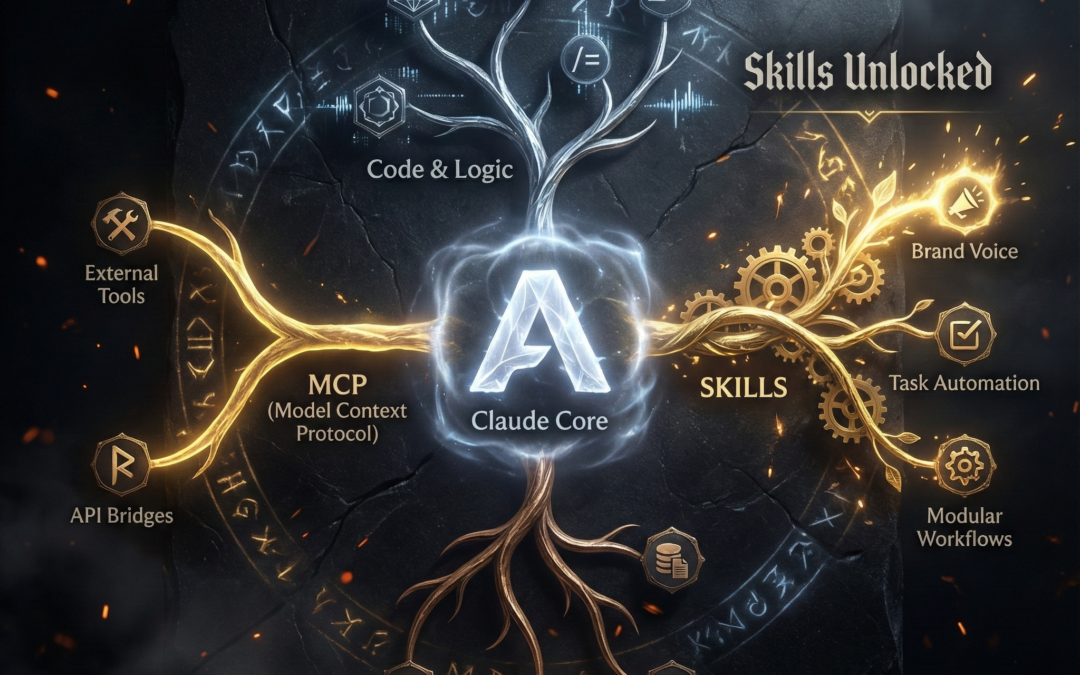
Forget everything you thought about AI automation. Anthropic has come up with Claude Skills released a feature that changes the way we design AI agents. And no, this isn't marketing hype - it's a real paradigm shift in the token economy.
What is the difference?
While the Model Context Protocol (MCP) is a standardized API interface for accessing data, the Claude Skills as modular instruction containers that prevent «context bloat» and increase tool precision through Progressive Disclosure (gradual disclosure).
While many are still puzzling over whether the Model Context Protocol (MCP) is the only solution, pioneers are already using skills to massively increase their productivity. The key question for developers and decision-makers today is: do you understand the fundamental difference?
What are Claude Skills anyway?
Imagine Claude Skills as reusable „instruction manuals“. They teach Claude exactly how YOU want tasks to be completed. Skills define tools, standards and processes. The best thing about it: Claude activates them fully automatically as soon as the context is right.
The problem before the skills: Previously, you had to repeat instructions (e.g. brand voice or coding standards) in every chat. This was inefficient, error-prone and consumed unnecessary tokens.
The solution with skills: You package your workflow instructions once in a skill file. That's it. Claude recognizes the need and executes the skill without you having to rewrite the prompt each time.
We cover MCPs and Claude skills in depth and with hands-on exercises in our DEV AI Bootcamp. -> to the DEV AI Bootcamp
Claude Skills vs. MCP vs. Projects: The comparison
There is often confusion in the community: Are skills now replacing the MCP? The short answer: No, they complement each other. Here is the distribution of roles in your AI stack:
| Component | Function | Metaphor |
|---|---|---|
| Claude | Core intelligence & logic | The brain |
| Skills | Reusable instructions | The operating instructions |
| MCP | Interfaces to external data | The tool (API access) |
| Projects | Dedicated workspace | The office / The context |
These components are not competitors, but Building blocks, which together result in powerful, modular workflows.
Why skills are a game changer for developers
The main problem with complex AI agents is the Context Engineering. Previously, all tool schemas and MCP server definitions often had to be loaded directly into the system prompt. The result:
- Token inefficiency: You pay for thousands of tokens, but only use a fraction per task.
- Latency: Huge prompts make the AI slower.
Claude Skills solve this problem elegantly: You only load specific instructions and tools when they are really needed. This makes your workflows leaner, faster and more cost-efficient.
Three types of skills that you can use immediately
1. official skills from Anthropic
Directly integrated into Claude (under Settings > Capabilities).
- PowerPoint Builder: Creates presentations according to your specifications.
- Theme Factory: Applies consistent designs to documents.
- Brand Guidelines: Uses official corporate identity guidelines.
Pro Tip: Only activate the skills that you really need. Too many active skills can impair the precision of execution.
2. custom skills for individual business logic
This is where the real power lies. You can create your own skills for specific needs:
- e-mail assistant with your personal Brand Voice.
- Product validation skills based on your internal criteria.
- Social media generators that exactly match your style.
3. community skills
A growing ecosystem on platforms such as GitHub. But be careful: always check the code for community skills to avoid security risks from malicious skill actions.
➽ ➽ We have compiled a list of the best Claude skills here, take a look: https://github.com/obviousworks/Claude-AI-skills-collection-2026
Power combination: Skills call up MCP server
The real magic happens when Skills and MCP combined can be used. A skill can control an MCP server to interact with apps such as Outlook, Gmail, Notion or Slack.
Example of a modular workflow:
- MCP integration pulls raw data from Notion.
- Custom Skill «Performance Analysis» analyzes the data according to your rules.
- Gmail connector (MCP) automatically sends the finished report to your team.
Best practices for working with Claude Skills
- Deactivate unused skills: Saves tokens and increases focus quality.
- Clear naming: Use descriptive names such as «Technical_SEO_Analyzer» instead of «Skill_1».
- Skills Chainen: Think in Lego building blocks. For example, combine a copywriting skill with an analysis skill.
- Install fallback: Instruct Claude to pursue an alternative plan if a tool call (MCP) fails.
Act now: Your first custom skill in 10 minutes
- Go to Settings > Capabilities and activate the Skill Creator.
- Start a new chat and write: „Make a new skill“.
- Describe your workflow.
- Download the generated file and upload it to the capabilities.
Do you want to exploit the full potential of AI agents for your company?
We at Obvious Works accompany you in your AI transformation - from the architecture of efficient skills to the integration of complex MCP infrastructures.

Matthias (AI Ninja)
Matthias puts his heart, soul and mind into it. He will make you, your team and your company fit for the future with AI!
About Matthias Trainer profile
To his LinkedIn profile

FAQ
Do I need a paid account?
Yes, skills are currently available for Pro and Team accounts.
Are skills always triggered automatically?
In theory, yes. In practice, it helps to explicitly mention the skill name in the prompt to increase reliability.
Do skills also work in Claude Code?
Yes, portability is one of the biggest advantages. Skills work seamlessly in the web app, desktop app and in Claude Code.
 DE
DE  EN
EN