
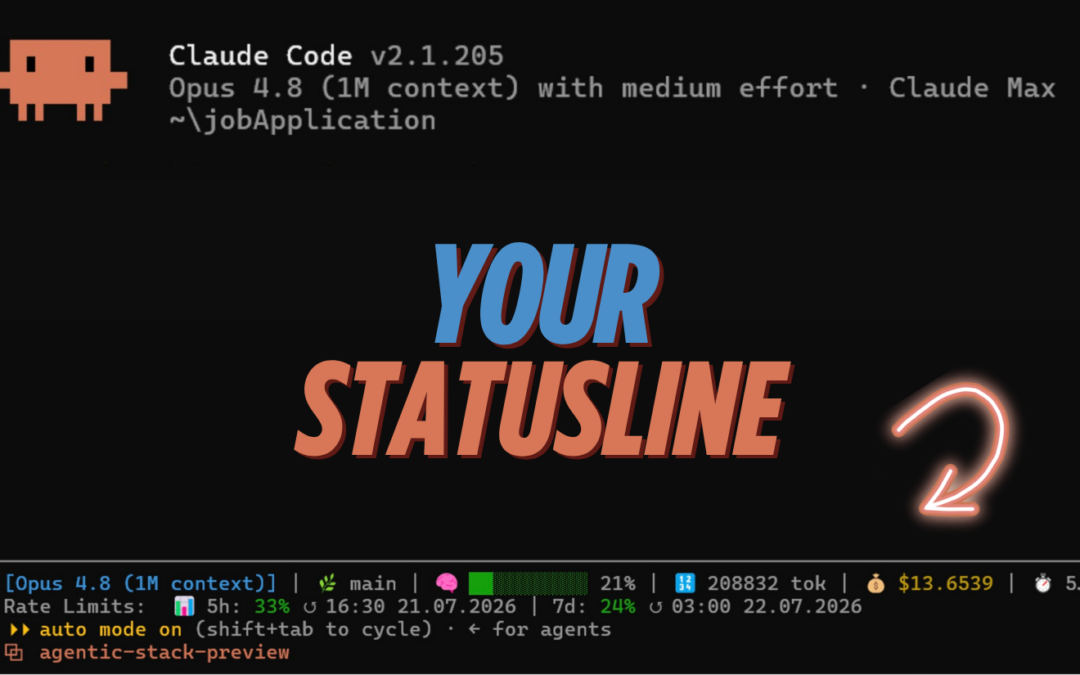
A Claude code session can run smoothly for a long time, only to later overlook details that were still present at the beginning. The model remained the same. Its working context has changed.
That's exactly why I built my own status bar. While I'm working, it shows me how full the context is, which model is running, which Git branch I'm working on, and when my rate limits will be reset.
This is what it looks like during a running session:
[Sonnet 5] | 🌿 main | 🧠 ███████░░░ 72% | 🔢 143,820 tok | 💰 $1.8420 | ⏱️ 48m 12s
Rate Limits: 📊 5h: 64% ↺ 5:30 PM July 24, 2026 | 7d: 37% ↺ 5:30 PM July 31, 2026
Claude Code Status Line Script

Installation takes about two minutes. The script runs locally and does not require any jq and does not consume any API tokens itself.
What does the Claude Code status line show?
The status bar summarizes the information I regularly need during a coding session:
| Advertisement | Meaning | What I use them for |
|---|---|---|
| Model | model.display_name |
Check whether the session is running with the planned model |
| Git Branch | Issue of git branch --show-current |
Avoiding Confusion Between Parallel Tasks |
| Context | context_window.used_percentage |
Summarize in a timely manner or start a new session |
| Tokens | Input and Output in the Current Context | Estimate the size of the active work context |
| Costs | cost.total_cost_usd |
Track Estimated Session Costs When Using the API |
| Duration | cost.total_duration_ms |
See how long the session has been running |
| Rate Limits | 5-hour and 7-day windows | Plan for Remaining Capacity on Pro and Max Models |
The display updates in response to events in Claude Code, such as a new response or after /compact. Anthropic lists the possible triggers and all available JSON fields in the Official Statusline Documentation on.
Why is Context utilization the most important metric?
Anthropic describes the context as the model's working memory. It contains the conversation history, read files, tool outputs, system instructions, CLAUDE.md content, and loaded skills.
More context provides the model with more material. At the same time, accuracy and recall often decline with very long contexts. Anthropic uses the term „Context Rot“ to describe this phenomenon and explains the causes in the article Effective Context Engineering for AI Agents.
Claude Code cleans up on its own as soon as the context window reaches its limit. Older tool outputs are removed. If necessary, Claude Code then summarizes the history up to that point.
This condensation is helpful, but it can cause details from earlier instructions to be lost. Anthropic therefore recommends defining permanent project rules in CLAUDE.md to save it and, when switching topics, use /clear to open a new context. For more information, see the official pages Explore the context window and Best Practices for Claude Code.
How do I read the Context traffic light?
My script divides the load into three categories. The thresholds are based on my own guidelines and are not an official recommendation from Anthropic.
| Area | Advertisement | My Approach |
| Less than 70 percent | Green | Continue working as usual |
| 70 to 89 percent | Yellow | Complete the current step and save your decisions |
| 90 percent or more | Red | Start the next big task in a new session |
When the light is yellow, I use a focused compact camera if needed:
/compact: Focus on the authentication bug, the chosen fix, and all open testsThis addition helps Claude Code include the relevant information in the summary. When I'm working on a task in a subject area I'm unfamiliar with, I use /clear. This way, the model does not have to reprocess the history of the conversation every time it provides a new response.
The percentage says little about the quality of individual tokens. A clean context with a 75 percent score may perform better than a chaotic context with a 40 percent score. The metric is an early warning system, not a measure of quality.
What are the benefits of the Statusline in everyday life?
1. The context becomes visible
Without a status bar, I often don't notice that a context is overloaded until I see the symptoms: Claude re-reads the same file, forgets a decision, or refers to an old requirement. The percentage indicator used to let me know earlier when I should clean up the session.
2. The model and branch are right next to each other
When you have multiple terminal tabs open, it can quickly become unclear which session belongs to which branch. The status bar reads the current Git branch from the working directory and displays it next to the model name.
3. Rate limits become predictable
Pro and Max subscribers receive data for the 5-hour and 7-day windows after the first API response. The script displays usage along with the reset time. If this data is missing, it hides the second line.
4. A place is set aside for costs and duration
total_cost_usd This is a client-side estimate and may differ from the final billing amount. For a Claude.ai subscription, this value may be missing or remain at zero. For API sessions, however, it still helps you get a sense of the usage associated with a long session.
5. The script doesn't need jq
Use many status bar examples jq to read the JSON input. My version uses Python and automatically detects python3 or python. This is also handy in Git Bash, where python3 sometimes only links to the Windows Store.
How do I install Statusline?
Step 1: Download the script
and save it as:
~/.claude/statusline.shOn macOS and Linux, ~ for your home directory. On Windows, the easiest way to run the script is in Git Bash, provided that Python is installed and accessible via python or python3 is available.
Step 2: Make the script executable
chmod +x ~/.claude/statusline.shStep 3: Configure Claude Code
Fill in ~/.claude/settings.json the entry statusLine:
{
  "statusLine": {
    "type": "command",
    "command": "~/.claude/statusline.sh"
  }
}
If your file already contains other settings, just fill in the field statusLine. Make sure to include commas between the existing JSON entries.
Step 4: Wait for the next interaction
Claude Code automatically loads changes to the settings. The display appears after the next interaction. Rate limit data is available in the Pro and Max plans only after the first API response of the session.
Claude Code can be accessed using the command /statusline You can also create a simple status bar yourself. The script from this article already includes the colored context indicator, Git branch, token display, runtime, and both rate-limit windows.
How does the script work?
With each update, Claude Code passes a JSON object via stdin. The script reads this input and parses the required fields using Python.
input=$(cat)It then searches for an available Python version:
if python3 -c "import sys" >/dev/null 2>&1; then
    PY=python3
elif python -c "import sys" >/dev/null 2>&1; then
    PY=python
else
    PY=""
fi
Among other things, the Python section reads these values:
| Variable | JSON field | Meaning |
MODEL |
model.display_name |
Displayed Model Name |
DIR |
workspace.current_dir |
Current Working Directory |
COST |
cost.total_cost_usd |
Estimated session costs in U.S. dollars |
PCT |
context_window.used_percentage |
Percentage of Context Window Used |
DURATION_MS |
cost.total_duration_ms |
Session duration in milliseconds |
TOK_IN |
context_window.total_input_tokens |
Input tokens in the current context |
TOK_OUT |
context_window.total_output_tokens |
Output tokens from the last response |
RL_5H |
rate_limits.five_hour.used_percentage |
Making the Most of the 5-Hour Window |
RL_7D |
rate_limits.seven_day.used_percentage |
Using the 7-Day Window |
RL_5H_RA |
rate_limits.five_hour.resets_at |
Resetting the 5-Hour Window |
RL_7D_RA |
rate_limits.seven_day.resets_at |
Reset the 7-day window |
Since Claude Code 2.1.132, total_input_tokens and total_output_tokens No more cumulative session values. They describe the current context from the most recent API response. The script adds both values together for the compact token display.
The progress bar consists of ten segments. Each segment represents ten percent. ANSI color codes color the bars and rate limits green, yellow, or red.
The complete code for statusline.sh
#!/usr/bin/env bash
#
# Claude Code status line by Obvious Works
# Documentation: https://code.claude.com/docs/en/statusline
#
# Installation:
#   1. Copy this file to ~/.claude/statusline.sh
#   2. Make it executable: chmod +x ~/.claude/statusline.sh
#   3. Add this to ~/.claude/settings.json:
# "statusLine": {
# "type": "command",
# "command": "~/.claude/statusline.sh"
# }
#
# The script uses Python for JSON parsing, so jq is not required.

input=$(cat)

# On Git Bash, `python3` may be a Windows Store stub. Fall back to `python`.
if python3 -c "import sys" >/dev/null 2>&1; then
    PY=python3
elif python -c "import sys" >/dev/null 2>&1; then
    PY=python
else
    PY=""
fi

if [ -n "$PY" ]; then
    JSON=$(printf '%s' "$input" | "$PY" -c "
import json
import sys
from datetime import datetime

d = json.load(sys.stdin)
m = d.get('model', {})
cw = d.get('context_window', {})
c = d.get('cost', {})
rl = d.get('rate_limits', {})

model = m.get('display_name', 'unknown')
cwd = d.get('workspace', {}).get('current_dir', '') or d.get('cwd', '')
cost = float(c.get('total_cost_usd', 0) or 0)
pct = int(float(cw.get('used_percentage', 0) or 0))
dur = int(c.get('total_duration_ms', 0) or 0)
tok_in = int(cw.get('total_input_tokens', 0) or 0)
tok_out = int(cw.get('total_output_tokens', 0) or 0)

rl_5h = rl.get('five_hour', {}).get('used_percentage')
rl_7d = rl.get('seven_day', {}).get('used_percentage')
rl_5h_s = f'{rl_5h:.0f}' if rl_5h is not None else ''
rl_7d_s = f'{rl_7d:.0f}' if rl_7d is not None else ''

def fmt_ts(ts):
    if ts is None:
 return ''
    return datetime.fromtimestamp(int(ts)).strftime('%H:%M %d.%m.%Y')

rl_5h_ra = fmt_ts(rl.get('five_hour', {}).get('resets_at'))
rl_7d_ra = fmt_ts(rl.get('seven_day', {}).get('resets_at'))

print(
    f'{model}|{cwd}|{cost:.4f}|{pct}|{dur}|'
    f'{tok_in}|{tok_out}|{rl_5h_s}|{rl_7d_s}|{rl_5h_ra}|{rl_7d_ra}'
)
" 2>/dev/null)

    IFS='|' read -r MODEL DIR COST PCT DURATION_MS TOK_IN TOK_OUT \
 RL_5H RL_7D RL_5H_RA RL_7D_RA <</dev/null && PCT=0
[ "$PCT" -gt 100 ] 2>/dev/null && PCT=100

CYAN='\033[36m'
GREEN='\033[32m'
YELLOW='\033[33m'
RED='\033[31m'
RESET='\033[0m'

if [ "$PCT" -ge 90 ]; then
    BAR_COLOR="$RED"
elif [ "$PCT" -ge 70 ]; then
    BAR_COLOR="$YELLOW"
else
    BAR_COLOR="$GREEN"
fi

FILLED=$((PCT / 10))
EMPTY=$((10 - FILLED))
[ "$FILLED" -gt 0 ] && printf -v FILL "%${FILLED}s" || FILL=""
[ "$EMPTY" -gt 0 ] && printf -v PAD "%${EMPTY}s" || PAD=""
BAR="${FILL// /█}${PAD// /░}"

MINS=$((DURATION_MS / 60000))
SECS=$(((DURATION_MS % 60000) / 1000))

BRANCH=""
if [ -n "$DIR" ] && git -C "$DIR" rev-parse --git-dir >/dev/null 2>&1; then
    GIT_BRANCH=$(git -C "$DIR" branch --show-current 2>/dev/null)
    [ -n "$GIT_BRANCH" ] && BRANCH=" | 🌿 $GIT_BRANCH"
fi

# Since Claude Code v2.1.132, these token values describe the current context
# window from the latest API response, not cumulative session usage.
TOK_TOTAL=$((TOK_IN + TOK_OUT))
COST_FMT=$(printf '$%.4f' "$COST")

printf "%b\n" \
    "${CYAN}[$MODEL]${RESET}${BRANCH} | 🧠 ${BAR_COLOR}${BAR}${RESET} ${PCT}% | 🔢 ${TOK_TOTAL} tok | 💰 ${YELLOW}${COST_FMT}${RESET} | ⏱️ ${MINS}m ${SECS}s"

# Anthropic currently enforces rate limits for Claude.ai Pro/Max subscribers
# after the first API response. Either window may be omitted.
if [ -n "$RL_5H" ] || [ -n "$RL_7D" ]; then
    RL_LINE=""

 if [ -n "$RL_5H" ]; then
        if [ "$RL_5H" -ge 90 ]; then
 RL_5H_COLOR="$RED"
 elif [ "$RL_5H" -ge 70 ]; then
            RL_5H_COLOR="$YELLOW"
 else
 RL_5H_COLOR="$GREEN"
 fi

 RL_5H_RESET=""
        [ -n "$RL_5H_RA" ] && RL_5H_RESET=" ↺ ${RL_5H_RA}"
 RL_LINE="📊 5h: ${RL_5H_COLOR}${RL_5H}%${RESET}${RL_5H_RESET}"
    fi

 if [ -n "$RL_7D" ]; then
 if [ "$RL_7D" -ge 90 ]; then
 RL_7D_COLOR="$RED"
 elif [ "$RL_7D" -ge 70 ]; then
            RL_7D_COLOR="$YELLOW"
 else
 RL_7D_COLOR="$GREEN"
 fi

 RL_7D_RESET=""
 [ -n "$RL_7D_RA" ] && RL_7D_RESET=" ↺ ${RL_7D_RA}"
 [ -n "$RL_LINE" ] && RL_LINE="${RL_LINE} | "
 RL_LINE="${RL_LINE}7d: ${RL_7D_COLOR}${RL_7D}%${RESET}${RL_7D_RESET}"
    fi

    printf "%b\n" "Rate Limits: ${RL_LINE}"
fi
What should I keep in mind when looking at the displayed values?
The cost estimate is an approximation. Anthropic expressly states that total_cost_usd may differ from the invoice.
According to the current documentation, rate limits only appear in Claude.ai Pro and Max, and only after the first API response. Either of the two time windows may be missing.
The context percentage is calculated from the input tokens. According to Anthropic, output tokens are not included in used_percentage The token count shown next to it adds the input and output together, which is why the two values cannot be converted exactly into one another.
The status bar is often active. Expensive commands such as git diff Therefore, large repository scans are not included. The script only reads the branch and remains lightweight even in larger projects.
How do I customize the status bar?
All visible parts are in the final printf-commands. You can remove emojis, change colors, or output additional JSON fields.
For example, the current Anthropic documentation lists session name, Claude code version, effort level, Vim mode, pull request status, and worktree data. Before adding a feature, check whether the field is available in your plan and Claude code version.
For a narrower display, for example:
printf "%b\n" \
    "${CYAN}[$MODEL]${RESET}${BRANCH} | ${BAR_COLOR}${BAR}${RESET} ${PCT}%"
Claude Code Status Line Script
AI Developer Bootcamp
Establishing an AI-first approach- Are you getting started with AI in software development? Then the AI Developer Bootcamp is the right thing for you.
In 12 weeks we establish new and stable AI habits with hands-on tasks and weekly retros in a dazzling learning approach.
- 👉 Info & registration for the AI Developer Bootcamp: obviousworks.ch/training/ai-developer-bootcamp
Agentic Coding Hackathon
Get back on track in 2–3 days!- Have you and your team already taken the first steps toward AI, or are you already well on your way? Then the Agentic Coding Hackathon is the perfect fit for you.
In 2–3 days, learn about and get a feel for the new role of Agentic Harness Engineer—from greenfield to brownfield. Will this lay the groundwork for a stable new AI-based software development process?
- 👉 Info & registration for the hackathon: https://www.obviousworks.ch/schulungen/agentic-coding-hackathon
Sources and Additional Anthropic Documentation
- Customize Your Status Bar, Claude Code Docs
- Explore the context window, Claude Code Docs
- Best Practices for Claude Code, Claude Code Documentation
- Effective Context Engineering for AI Agents, Anthropic Engineering
- Context Windows, Claude Platform Docs
FAQ on the Claude Code Status Line
Does the status line use additional tokens?
No. Anthropic confirms in its documentation that the script runs locally and does not consume any API tokens itself.
Do I need jq?
No. The script reads the JSON input using Python. It first looks for python3 and uses it as needed python.
Does the script work on Windows?
Yes, the easiest way is to use Git Bash with Python installed. For PowerShell, Anthropic provides its own examples in the official Statusline documentation.
Why does the status bar show $0?
For Claude.ai subscriptions, direct API costs aren't always available. Even in a new session, the value may be missing at first. The script sets missing costs to $0.0000.
Why don't I see any rate limits?
The Field rate_limits According to Anthropic, this is only returned for Claude.ai Pro and Max after the first API response. In API-based setups or before the first response, the second line remains blank.
Does the status line replace the command /context?
No. The status bar displays the load in a concise manner. /context provides a breakdown by category and information on which types of content take up space.

Matthias (AI Ninja)
Matthias puts his heart, soul and mind into it. He will make you, your team and your company fit for the future with AI!
About Matthias Trainer profile
To his LinkedIn profile

 DE
DE  EN
EN