Why does Claude Code feel useless to most developers?
Because most only configure 1 of 4 layers. You run /init, and wonder why Claude hallucinates file structures, recommends the wrong libraries and misses the coding style.
The truth: CLAUDE.md is only the first of four pillars. The complete 2026 setup includes 5 scopes, the WHAT/WHY/HOW framework, 7 core rules and advanced patterns with hooks, skills and multi-session workflows. If you orchestrate this, you are working with an AI teammate that gets better over time. If you ignore it, you're going round in circles.
This guide exactly mirrors the Architecture Guide 2026, which I have compiled as a cheat sheet for development teams. Concrete. Realizable. In one afternoon. But really in a short time!
Claude Code Architecture Cheat Sheet
What is CLAUDE.md actually - and why is it not a README?
CLAUDE.md is the persistent memory of your AI teammate. It is updated with every claude-Start and defines how Claude understands your project. A README documented for humans. CLAUDE.md onboarded your AI colleague.
The difference is fundamental, and Boris Cherny, creator of Claude Code and staff engineer at Anthropic, puts it in a nutshell:
«CLAUDE.md is not a README for humans. It's onboarding docs for your AI teammate - and every correction you add is a bug that never happens again.»
- Boris Cherny, Creator of Claude Code - Staff Engineer @ Anthropic
The consequence: every line has to earn its place. According to an InfoQ interview in January 2026, Boris‘ own CLAUDE.md has just 2,500 tokens (around 100 lines) - and his team shipt Claude Code himself (source: InfoQ, January 2026).
What are the 5 scopes of CLAUDE.md?
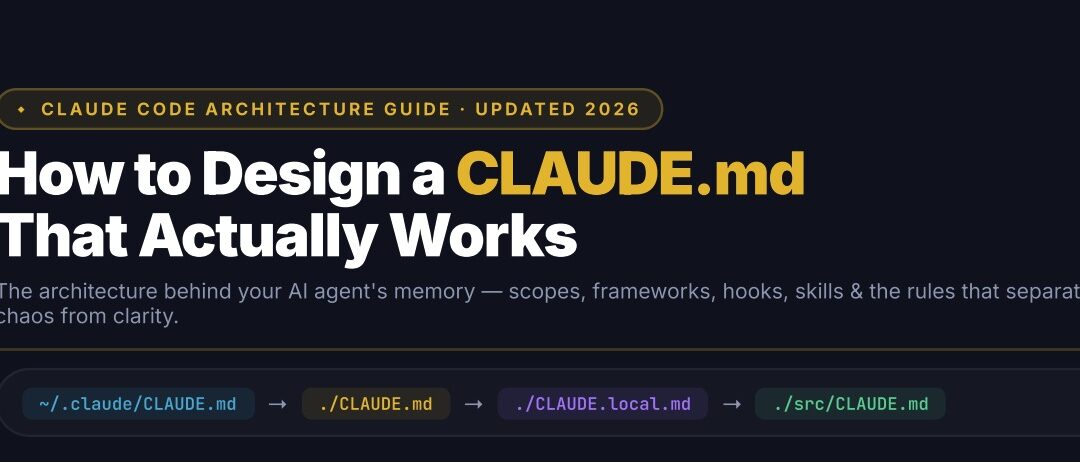
Claude Code loads CLAUDE.md files from several paths with a clear cascade. The rule: Last scope wins on conflicts. The most specific scope prevails.
| Scope | Path | Purpose | Team-shared? |
|---|---|---|---|
| Global | ~/.claude/CLAUDE.md |
Personal defaults across all projects - coding style, universal rules. Always loaded. | No |
| Project | ./CLAUDE.md |
Project-specific rules. Build commands, conventions. Belongs in Git. | Yes |
| Local Secret NEW 2026 | ./CLAUDE.local.md |
Personal notes and secrets. Belongs in .gitignore. Never shared. |
No |
| Folder | ./src/CLAUDE.md |
Module-level overrides for APIs, components. Loaded on-demand. | Yes |
The cascade is strategically important. Universal rules belong in the root. Module-specific knowledge in subdirectories. This way, they are only loaded when Claude is working in the folder - and save context tokens.
Local Secret Scope tip
The CLAUDE.local.md-Scope is new in 2026 and worth its weight in gold: This is where your personal shortcuts, WIP notes and sensitive paths go without ever ending up in Git. The file belongs immediately in .gitignore, as soon as you put them on.
What is the WHAT/WHY/HOW Framework for CLAUDE.md?
The WHAT/WHY/HOW framework forces you to be complete. If you leave out one of the three, Claude guesses. And Claude guesses wrong. Here is the exact structure:
WHAT - Give context
Without this basis, Claude is flying blind:
- Project name and purpose
- Tech stack with Versions (not «React», but «React 18.3 + TypeScript 5.4 + Vite 5»)
- Repository structure map (where are utils, types, API endpoints located?)
- Critical dependencies
- With Monorepos: what does each individual app do?
WHY - Set principles
The rules that your team has established over months:
- Architectural decisions with reasons
- Code style and lint rules
- Naming conventions
- Anti-patterns that you want to avoid
- Security constraints
HOW - Define workflows
The operational commands that count for each session:
npm run build- Build-Commandnpm test- Execute after each changeeslint . --fix- with every save- Branch and commit strategy
- Deploy and CI/CD steps
Concrete HOW example that works immediately
## Workflow
- Run `npm test` after every code change
- Always create a new branch per task. NEVER commit to main directly
- Use Conventional Commits (feat:, fix:, refactor:, docs:)
- Run `eslint . --fix` before every commit
- Open a PR via `gh pr create` when work is complete
What does a good CLAUDE.md look like in practice?
There are two ways to create CLAUDE.md: write manually or /init run in Claude Code. Neither of them delivers a production-ready result. /init generates a bare-bones scaffold. Manual writing usually lacks a consistent structure.
The better option: Start with a template that already maps the WHAT/WHY/HOW framework, the hooks configuration and SKILL.md templates. My team has published an Agentic Coding Meta-Prompt Repository on GitHub that provides exactly that - github.com/obviousworks/agentic-coding-meta-prompt.
The repository contains:
- CLAUDE.md Template (≤200 lines)
- AGENTS.md for multi-agent workflows
- Hooks-Config in
.claude/settings.json - SKILL.md templates and examples
How do you write precise instructions instead of vague rules?
The only difference between a CLAUDE.md that is ignored and one that works: Precision. Vague instructions for Claude are like vague tickets for a junior developer - both hallucinate an interpretation.
| ✗ Vague (is ignored) | ✓ Precise (is followed) |
|---|---|
| Write clean code | Use camelCase for variables, PascalCase for React components |
| Test everything | npm test after every change, min 80% coverage for utils/ |
| Prefer TypeScript | MUST use TypeScript strict mode. MUST NOT use any type |
| Be careful with git | Always create a new branch per task. NEVER commit to main directly |
Precision forces you to articulate your implicit team standards. That is valuable, even if you would never use Claude again.
What are the 7 rules that make your CLAUDE.md setup really work?
These seven rules come directly from the Claude Code Docs and Boris Cherny's publicly shared workflow. They are the foundation:
- Run
/initfirst. Let Claude scaffold the baseline from your codebase. Then curate it. Never start from scratch - you forget too much. - Stay under 200 lines. Too long = ignored. Claude attends ~150 instructions reliably. Each line must be earned.
- Hooks for 100% enforcement. CLAUDE.md is advisory (~70% followed). Hooks are deterministic. Use them for lint, test, security.
- Use
@importsfor modularity. New in 2026: Split Configs via@docs/git.md. Cleaner, scoped, reusable across projects. /compact& Plan Mode. New in 2026:/compactfor 50% Context-Fill. Plan mode for each task with 3+ steps.- Update it monthly. CLAUDE.md is a Living Document. Every time Claude makes a mistake: add a rule. Boris calls this Compound Engineering.
- Reference, don't duplicate. References to
package.jsonandtsconfig. Do not copy. Use the@path/to/fileSyntax.
How does compound engineering work with CLAUDE.md?
Compound engineering is the game changer. The principle that Boris Cherny has established at Anthropic: Every code review, every correction, every error becomes a new rule in CLAUDE.md. The file grows with the team's experience.
In Anthropic's workflow, Boris uses the @.claude-tag on PRs from colleagues - Claude automatically inserts the learning in CLAUDE.md (source: Vibe Sparking AI, January 2026). The result after three months:
- Claude makes the same mistake never again
- Team know-how is systematically codified
- New team members have access to all learnings from day 1
This is not hype. This is the real ROI.
Which Advanced Patterns will make the difference in 2026?
Beyond the basics, there are three systems that separate experienced teams from amateur users: Hooks, skills and multi-session. All three are part of the cheat sheet and should be in every professional setup by the end of Q2 2026.
⚡ The hooks system
Hooks are deterministic callbacks in .claude/settings.json. Where CLAUDE.md is advisory (Claude can «forget» it), hooks are mandatory. Exit code 0 = allowed, exit code 2 = blocked. No discussion.
The four most important patterns:
- PreToolUse: Route risky operations to Opus for Approval - e.g.
git push --force - PostToolUse: Auto-Format code after each file edit (Boris uses
bun run format) - Stop Hook: Verifies the work before Claude marks «done»
/careful: Blocks destructive commands such asrm -rf
Browse the configured hooks at any time via /hooks in the current Claude Code.
🧠 The skills system
Skills are markdown-based guides in .claude/skills/SKILL.md, which loaded on-demand, not for every session. This is the decisive difference to CLAUDE.md: Skills save your context.
The core features:
- Invocation via
/skill-nameor automatically when the description matches - Embed
!`command`for live shell output to the prompt - More transparent than MCPs - auditable, no black box
- Including libs so that Claude composes instead of building from scratch
Typical skills in productive teams: code review patterns, testing conventions, migration guides, BigQuery analytics. Boris‘ team has a BigQuery skill in the repo and uses it daily for analytics directly in Claude Code.
🔀 Multi-session workflow (Boris's Method)
Boris Cherny leads at Anthropic 10 to 15 Claude sessions in parallel: 5 locally in terminal tabs, 5-10 on claude.ai/code. Plus sessions that he starts from his iPhone in the morning. Sounds crazy, but it's systematic:
- Each session has its own Git Worktree - Changes do not collide
/compactat 50% Context,/clearwhen switching tasks- Plan → Execute → Verify (Tests + Linter + Build, always)
- After every error: Fix in
tasks/lessons.mdencode
The self-improvement loop is the real lever. Every correction becomes a rule. After three months, your CLAUDE.md replaces months of onboarding documentation.
What is the difference between CLAUDE.md and AGENTS.md?
CLAUDE.md is for single-agent workflows in the primary Claude context. AGENTS.md is the new standard for multi-agent workflows and interoperability between Claude, Cursor, Cline and other AI coding tools.
If you orchestrate subagents - e.g. a «Code Simplifier» subagent after each feature or a «Verify App» subagent for end-to-end tests - the configuration belongs in AGENTS.md. This makes your setup tool-agnostic and portable across teams.
How many lines should your CLAUDE.md have?
Less than 200 lines. Maximum 150 instructions. This is Anthropic's official recommendation and community consensus 2026.
The reason is in the official docs: Bloated CLAUDE.md files cause Claude to lose the actual Instructions ignored (source: Claude Code Docs, 2026). If Claude has a rule despite YOU MUST repeatedly, your file has become too long and the rule is lost.
The test for each individual line: «Would removing that line make Claude make mistakes?» If not: delete. This discipline is unpleasant, but essential.
For longer content you use @imports for modularity:
# CLAUDE.md (Root)
@docs/architecture.md
@.claude/git-conventions.md
@.claude/security-rules.md
FAQ: The most frequently asked questions about CLAUDE.md
Do I need CLAUDE.md in every project?
Yes, if you use Claude Code seriously. The 2026 community opinion is clear: CLAUDE.md is as important as .gitignore. Essential Infrastructure, non-optional documentation.
What is the difference between CLAUDE.md and a README?
The README is for people who want to start the project. CLAUDE.md is onboarding documentation for your AI teammate. Different audiences, different structure, different length.
Should CLAUDE.md be committed in Git?
Yes - the project-specific ./CLAUDE.md belongs in Git for team consistency. Personal notes and secrets belong in ./CLAUDE.local.md, which in .gitignore stands. The global scope file ~/.claude/CLAUDE.md remains local anyway.
How often should I update CLAUDE.md?
At least monthly, ideally immediately after each recurring error. Boris‘ rule of thumb: «Anytime we see Claude do something incorrectly, we add it to CLAUDE.md so it doesn't repeat next time.» This is compound engineering in its purest form.
How many tokens does a CLAUDE.md use?
Boris Cherny's CLAUDE.md at Anthropic has around 2’500 tokens (~100 lines). More than 5,000 tokens is almost always too many - then you start to displace Claude's real work context.
Does CLAUDE.md also work with Cursor or Windsurf?
Not directly. Cursor uses .cursorrules, Windsurf has its own format. AGENTS.md is the emerging open standard for cross-tool configuration. CLAUDE.md remains the canonical file for pure Claude code use.
Do I have to fill skills manually?
No. You can explicitly add skills via /skill-name or Claude can trigger them automatically if the description matches the current task. Community skills are available on GitHub for almost every use case - from code review to BigQuery analytics.
What should I do if Claude still ignores the CLAUDE.md rules?
Three possible causes in this order: (1) The file is over 200 lines, Claude loses important rules in the Noise. Shorten. (2) The rule is vaguely formulated. Make it more precise with «MUST» or «NEVER». (3) The rule is really deterministic critical - then force it via hook in .claude/settings.json.
Your 48-hour action plan
Setup time: one afternoon. Effect: months.
Day 1 - Foundation (90 minutes):
- Lead
/initin your main project - Shorten the generated CLAUDE.md to less than 200 lines
- Structure according to WHAT/WHY/HOW
- Lay
CLAUDE.local.mdfor personal notes, add.gitignore - Committee
CLAUDE.mdin Git
Day 2 - Advanced Patterns (60 minutes):
- Identify 3 recurring corrections from the last week
- Code them as precise rules in CLAUDE.md
- Setup a first PostToolUse hook for Auto-Lint
- Create a first skill in
.claude/skills/(e.g.code-review.md) - Test with a real task and verify the behavior
After 30 days - Review: Which rules have worked? Which are ignored (then: too long, too vague or hook missing)? Which new corrections should be included?
The actual promise
Claude Code is not a tool. It's a teammate who becomes exactly as good as you make their onboarding. The 4 layers - CLAUDE.md, Skills, Hooks, Subagents - are your levers. The 5 scopes, the WHAT/WHY/HOW framework and Compound Engineering are your operating system.
An afternoon setup. Then you'll understand why teams that have already made the switch in 2026 don't want to go back - and why the others are losing context every day that they could have codified long ago.
The question is not whether you need this architecture. The question is how many more months you want to work without it.
Claude Code Architecture Cheat Sheet
AI Developer Bootcamp
Establishing an AI-first approach- Are you getting started with AI in software development? Then the AI Developer Bootcamp is the right thing for you.
In 12 weeks we establish new and stable AI habits with hands-on tasks and weekly retros in a dazzling learning approach.
- 👉 Info & registration for the AI Developer Bootcamp: obviousworks.ch/training/ai-developer-bootcamp
Agentic Coding Hackathon
Be on course in 3-5 days!- Are you and your team already really good with AI? Then the Agentic Coding Hackathon is the right thing for you.
Learn and establish your new AI-based software development process in 3-5 days?
- 👉 Info & registration for the hackathon: https://www.obviousworks.ch/schulungen/agentic-coding-hackathon

Matthias (AI Ninja)
Matthias puts his heart, soul and mind into it. He will make you, your team and your company fit for the future with AI!
About Matthias Trainer profile
To his LinkedIn profile
Do you need help setting up your Claude Code architecture?
We at Obvious Works offer hands-on training and in-depth support for the integration of agentic coding in development teams. No generic AI talk, but proven setups that work in production - from the CLAUDE.md architecture review to multi-session orchestration with hooks, skills and subagents.
Sources
- Anthropic - Best Practices for Claude Code (Official Docs), 2026
- InfoQ - Inside the Development Workflow of Claude Code's Creator, January 2026
- Vibe Sparking AI - Boris Cherny's Claude Code Workflow Revealed, January 2026
- Pragmatic Engineer - Building Claude Code with Boris Cherny, March 2026
- Push to Prod - How the Creator of Claude Code Actually Uses Claude Code, February 2026
- Morph Labs - Claude Code Best Practices: The 2026 Guide to 10x Productivity, February 2026

Your Partner for
Agility & requirements & artificial intelligence
We train product owners, project managers, software developers, CTOs, HR professionals and managers.
Address
Obvious Works GmbH
Dammstrasse 16
CH-6300 Zug
Switzerland
Contact us
- info[at]obviousworks.ch
(+41) 76 292 03 68

 DE
DE  EN
EN